I’ve been getting a lot of questions lately about how I actually put Rolling with Scissors together. Not the philosophy behind the music or why I’ll spend hours on a deep dive most people wouldn’t attempt, but the practical side of it: the gear, the software, and the workflow that turns an idea into a finished three-hour radio show every single week. This post is the long answer.
The short version is that this isn’t a podcast rig or a casual hobby setup. It’s a compact broadcast studio built by someone who’s been doing audio long enough to know what breaks, what lies, and what you absolutely cannot afford to fight with when there’s a hard clock involved.
The Core Philosophy
I’m an old-school audio guy. I came up reaching for knobs instead of menus and learning very quickly that gain staging, monitoring, and signal flow matter more than flashy features. That mindset still drives every decision I make. I want tactile control, predictable behavior, and tools that do exactly what they’re supposed to do without trying to reinvent my workflow. Rolling with Scissors may sound loose and conversational, but under the hood it’s deliberately boring and rock-solid. That’s not an accident.
Monitoring and Listening
My studio monitors are KRK Rokit 5s. I’ve worked on a lot of speakers over the years, and these hit the right balance for me. They’re honest enough to tell me when something’s wrong, but not so unforgiving that I’m chasing problems no listener will ever hear. Monitoring runs through an Audient NERO monitor controller, which is one of the most important pieces of gear in the room. Being able to instantly mute, dim, switch sources, or adjust levels without touching software matters when you’re moving between production, recording, and broadcast work.
For headphones, I use Sony MDR-7506s. They’re a broadcast and studio standard for a reason. They translate everywhere, they don’t sugarcoat anything, and I know exactly how things should sound through them because I’ve been using some version of these headphones for most of my adult life.
The Computer and Control Surface
At the center of the studio is an M1 Mac mini with 16 GB of RAM and a 512 GB SSD. It’s fast, silent, and completely unremarkable in the best possible way. I don’t want my computer to feel like part of the performance. I want it to disappear and just do the work. My DAW of choice is Reaper. It’s lean, brutally efficient, endlessly customizable, and it never tries to tell me how I should be working.
To keep things tactile and fast, I use a Steam Deck loaded with custom hotkeys mapped directly to my Reaper workflow. It’s not a traditional control surface, but it gives me a flexible, programmable interface that fits the way I work without locking me into expensive, proprietary hardware.
Audio Interface and Microphone
My audio interface is a Focusrite 2i2. It’s clean, dependable, and does exactly what it’s supposed to do without drama. For the microphone, I use an Electro-Voice RE20, the classic broadcast microphone. There’s a reason this mic has lived in radio studios for decades. It’s forgiving, consistent, rejects room noise beautifully, and sounds the same whether I’m leaning back or right on top of it. If Rolling with Scissors sounds like real radio, the RE20 is doing a lot of the heavy lifting.
Music Library and Playback
My entire music library lives on a network attached storage device. This isn’t just about storage space, it’s about control and longevity. I’m not relying on a single internal drive or a cloud service that can change terms, lose metadata, or disappear overnight. Everything is local, backed up properly, and accessible no matter what machine I’m working on.
For music playback and library management, I use Swinsian. That spelling matters. Swinsian is exactly what I’ve been looking for for years: a fast, no-nonsense catalog and tag editor with beautiful playback. It feels like old-school iTunes before Apple broke it, buried basic functionality, and rebranded the mess as Apple Music. Swinsian stays out of the way and lets me focus on the music itself, which is exactly what a music player should do.
How the Show Comes Together
A few days before the show, I decide what kind of deep dive I’m going to do. Sometimes it’s an artist, sometimes a run of albums, sometimes a theme that only really makes sense once you hear it unfold. I build the entire playlist in Swinsian first, making sure the flow works and the timing is going to land where it needs to. Once the playlist is locked, I save it and move into Reaper.
From there, it’s a straightforward drag-and-drop process, pulling each track into the DAW in the correct order. I record my voice tracks directly into Reaper, lay them in between the music, and normalize everything so the levels are consistent from start to finish. Timing is the final step. Rolling with Scissors is a three-hour show, and that limit matters. I usually trim the final track to make sure we hit the time window exactly, which is why you’ll sometimes hear the end of the show fade or cut off. That’s not a mistake. It’s a deliberate decision to land the plane where it’s supposed to land. Once everything is set, the entire show is exported as a 320 kbps MP3, ready for broadcast and archive.
Playlists, Reporting, and Episode Notes
Once the show itself is finished, there’s still some important work to do. I have a custom hotkey on the Steam Deck that automatically exports the final playlist out of Swinsian as a CSV file. That file drops directly into Numbers, which for non-Apple people is essentially Microsoft Excel. From there, I export the playlist straight into the episode notes on the website.
You may have noticed that my playlists are formatted as artist, song, album, label, and year. Everything except the year is required reporting for SoundExchange, the government-mandated entity that’s supposed to make sure artists get paid when their music is broadcast. The year isn’t required, but I include it because context matters, and because I’ve always believed listeners deserve more than just the bare minimum.
Each episode also gets a full set of episode notes. If you listen to the program, you’ve probably read them. My digital assistant and I put those together every week to give you a clear idea of what’s coming up on the show, what the focus is, and why certain music ended up where it did. It’s part documentation, part storytelling, and part respect for the audience that actually pays attention.
From the Station to the Home Studio
When I lived in Madison, I usually did Rolling with Scissors live from the station. Even back then, I kept asking the same question of the technical team: I’ve got a fully-equipped studio at home, I live a few blocks away, and we already have the technology for remote broadcasting. Why can’t I just do the show from my own studio? At the time, there was still a rule that required a physical person to be present in the building where the transmitter originated. That rule eventually relaxed, and once it did, everything changed.
Now, I can do the program from anywhere. As long as I have my studio, a solid connection, and the infrastructure in place, the show goes on. That flexibility is huge, not just for convenience, but for longevity. It means Rolling with Scissors isn’t tied to a single room, a single building, or even a single city. The show lives wherever I can set up and do the work properly, which feels exactly right for something that’s always been about independence and control.
A Proper Shout-Out
Nearly all of the gear in this studio, everything except the Steam Deck, came from Sweetwater. They deserve a real shout-out. They’ve consistently made sure I have exactly what I need to do this program week after week, without hassle and without surprises. When you’re building a studio you rely on, that kind of consistency matters more than flashy marketing ever will.
Why This Setup Works
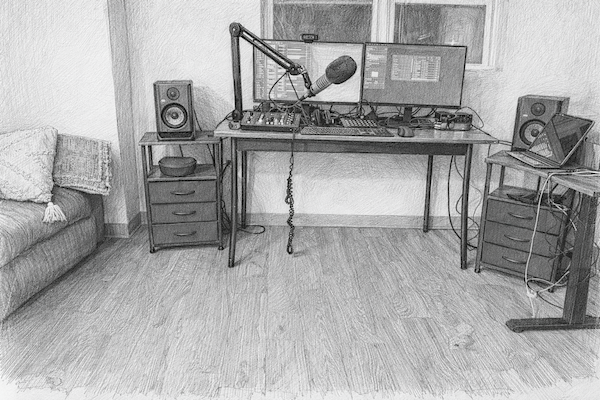
This studio isn’t flashy, and it’s not built to impress anyone scrolling past a photo online. It’s built to work, every single time. Every piece of gear earns its place by solving a real problem, not by promising some abstract improvement. When I sit down to do Rolling with Scissors, I’m not fighting software, digging through menus, or wondering what’s going to break today. I can focus on the music, the pacing, and the stories. The gear disappears, and the show takes over. That’s exactly how it should be.
Have something to say? We welcome your comments below — this is where the real conversation happens.
Each blog post is shared across our social transmitters, but those are just bigger antennas. The original source — and the signal we control — is right here on the blog. If you’re looking for other ways to stay updated on Rolling with Scissors, you’ll find our official transmitters linked below.
Spin the dial — we’re probably on it. Lock onto your frequency. Pick your favorite antenna below and ride the signal back to us.
Facebook • Instagram • Threads • Bluesky • X (Twitter)
0 Comments